
Scans completed in minutes. Files delivered instantly.

Purchase a Scan Pack
Buy a Scan Pack, then choose a ScanHub Access Location that supports your required scan size at checkout. View scan sizes.Receive your PIN
Within 24 hours, your personal PIN code will arrive by email. Returning customers continue using their existing PIN. PINs are issued on business days.Schedule (if required)
If scheduling is required, the ScanHub Access Location will contact you after checkout. Walk-in access is available at select locations.Scan and receive your files
Bring your object to the ScanHub Access Location, enter your PIN, select your scan option, and complete your scan. Files are delivered by email, with a QR code for quick mobile download.
Follow these simple steps:
How ScanHub Works
Need help?
On-site staff can assist during your visit, and our support team is always available.

Let’s Get You Scanning
Step into the digital world and bring your ideas to life.
Choose the size that fits your object
ScanHub locations host different system sizes.
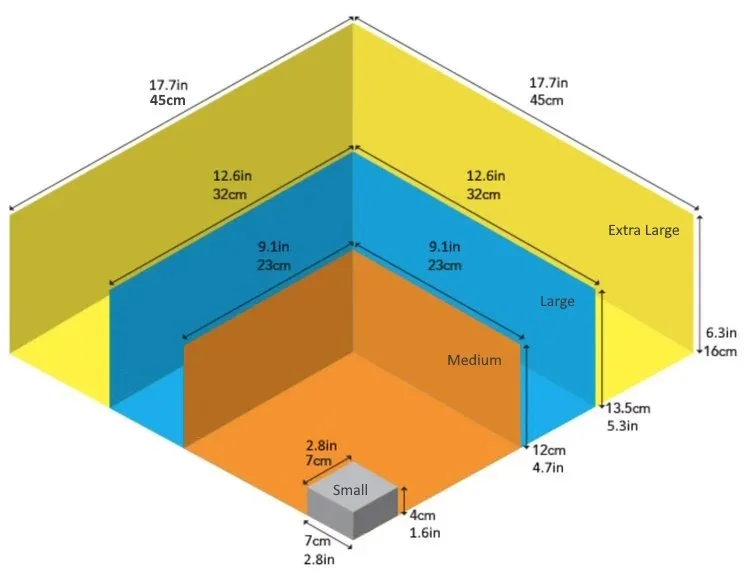
We offer four ScanHub 3D scanning systems, each designed for different object sizes and project needs:
Small (S)
7 x 7 x 5 cm (2.8 x 2.8 x 1.6 in)
Fine detail, small parts
Medium (M)
23 x 23 x 12 cm (9.1 x .9.1 x 4.7 in)
Everyday scanning, mid sized parts
Large (L)
32 x 32 x 13.5 cm (12.6 x 12.6 x 5.3 in)
Larger objects, high surface accuracy
X-Large (XL)
45 x 45 x 16 cm (17.7 x 17.7 x 6.3 in)
Oversized items
Check your location before booking.


“Our scan time dropped to minutes. ”
St. Clair College
School of Engineering Technologies, Apprenticeships, & Skilled Trades